
Organizer guide
Running a tournament with BracketButler, start to finish.
1.What BracketButler does
The short version
You build a bracket in the web app and link it to a Discord channel. Players post their post-game screenshots in that channel. The bot reads each screenshot, works out which match it belongs to and who won, records the result, advances the bracket and announces what is up next. The public bracket page updates as it goes.
You step in when it asks — a screenshot it is not confident about, an unknown gamertag, a substitution — or when you want to change something it got right but you want different.
The three pieces
- The web app — creating tournaments, the organizer controls, and the public bracket, teams and stats pages.
- The Discord bot — watches the screenshots channel, reads images, posts results.
- The bracket engine — owns the actual tournament logic. Both of the above go through it, so a result recorded in Discord and one recorded on the admin page do exactly the same thing.
2.Before your first tournament
Signing in
Sign in with Discord. That is what ties your account to the servers you are in — the channel pickers later only offer channels from servers that both you and the bot are in. There is also an organizer username and password option if Discord sign-in is not configured on the server.
Once you are in, Dashboard lists your tournaments.
Getting the bot into your server
The bot has to be a member of the Discord server before it can watch a channel, and it needs to be able to read messages, post, add reactions and see attachments in the channel you plan to use.
If a server or channel does not appear in the pickers later, it is almost always this: either the bot is not in that server, or your Discord account is not.
3.Creating the tournament
New Tournament walks through it in numbered steps. Nothing is saved until you save, but your typing is mirrored into the browser as you go, so a refresh or a dropped connection does not cost you a 40-player roster.
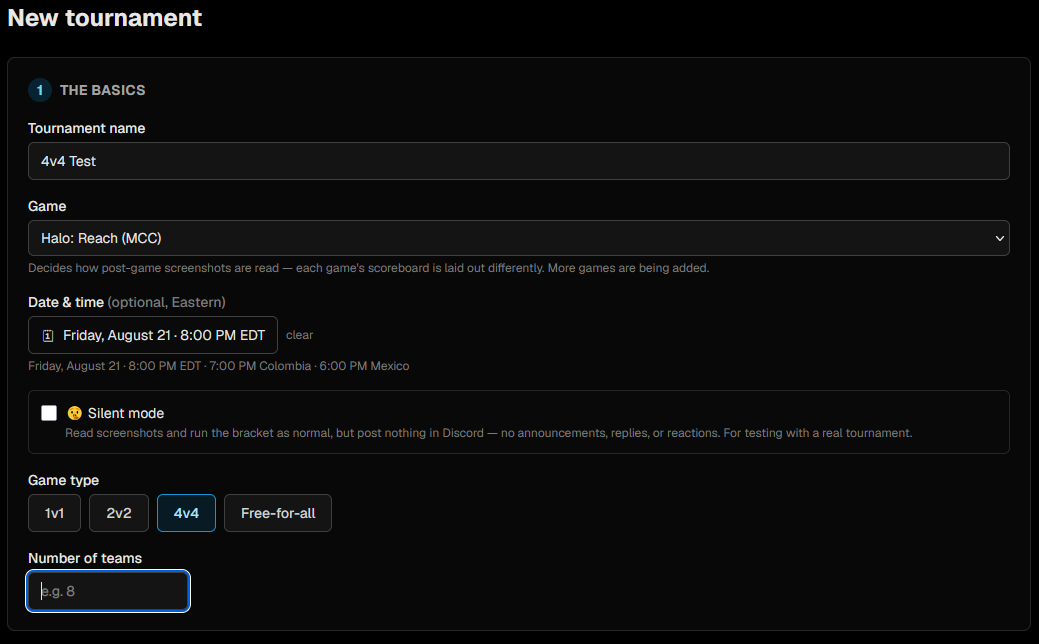
1. The basics
Name, game, and the shape of the field: 1v1, 2v2, 4v4 or FFA. You can set a start time here or later — it is entered in Eastern and shown to everyone else in their own region's time.
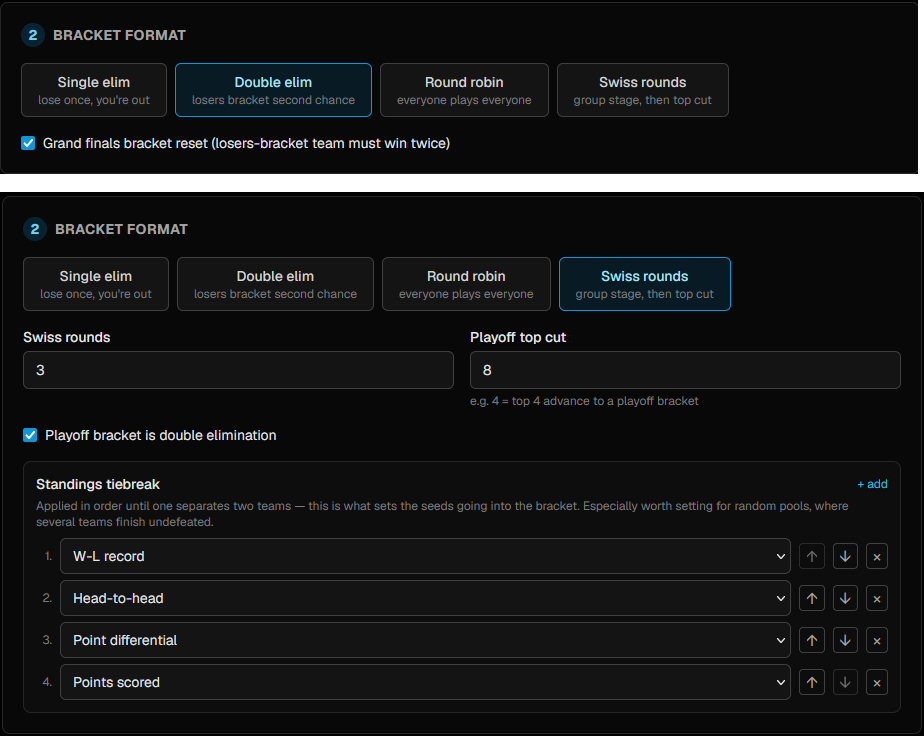
2. Bracket format
- Single elim — lose once, you are out.
- Double elim — a losers bracket gives everyone a second chance. Optionally with a grand finals bracket reset, where a team coming up from the losers bracket has to win the final twice.
- Round robin — everyone plays everyone.
- Swiss rounds — a group stage that pairs on record, then a top cut into a playoff bracket.
Round robin and Swiss can be split into pools — teams only play others in their own pool during the group stage — and you choose how the pools feed the playoff seeds. For both you also set how many teams make the top cut and whether that playoff bracket is single or double elim.
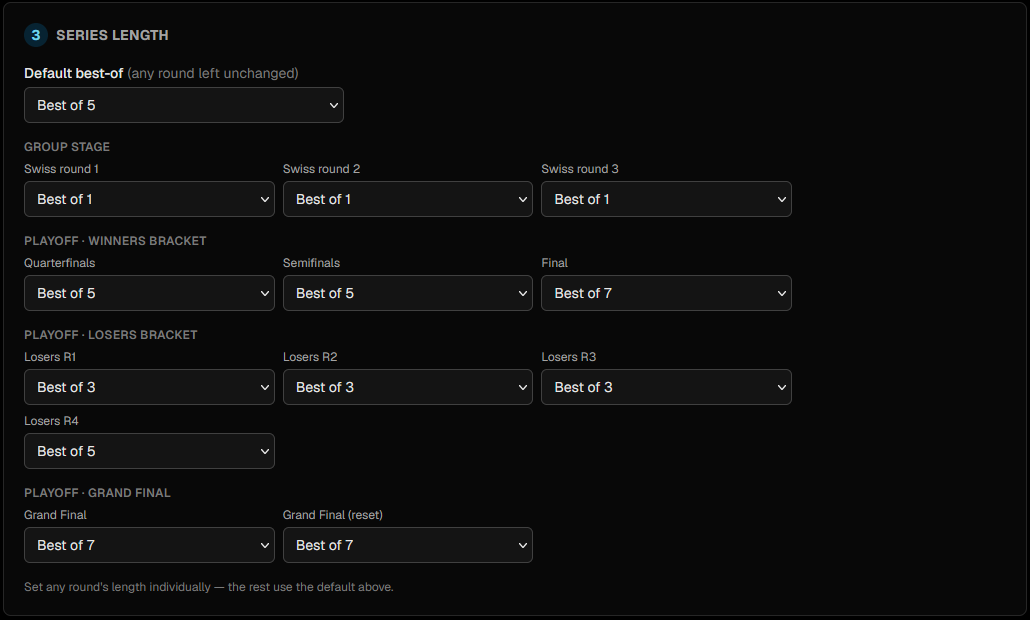
3. Series length
The default best-of, and an override per round if you want the early rounds shorter than the finals. Rounds generated later — further Swiss rounds, the playoff bracket — inherit whatever you set here.
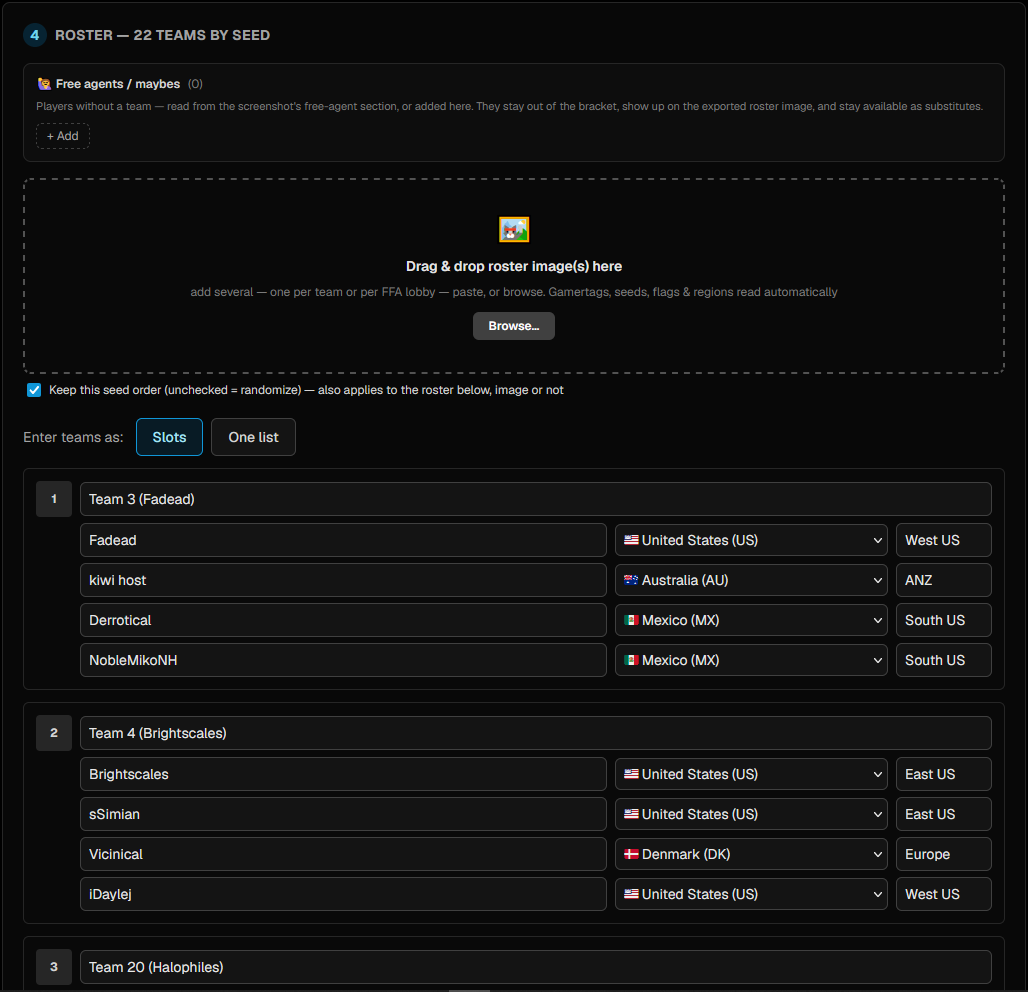
4. The roster
Two ways to enter it: Slots gives a box per team with a row per player, and One listtakes a pasted list. A team's position in the list is its seed, and teams can be dragged to reorder.
Each player row carries a gamertag, a country and a region. The country is a dropdown of every ISO country — pick from the list rather than remembering that Spain is ES. It is what draws the flag beside a player on the bracket and scoreboards. Region stays free text next to it, for whatever you call the server they play on (North US, ANZ).
Importing a roster from a screenshot
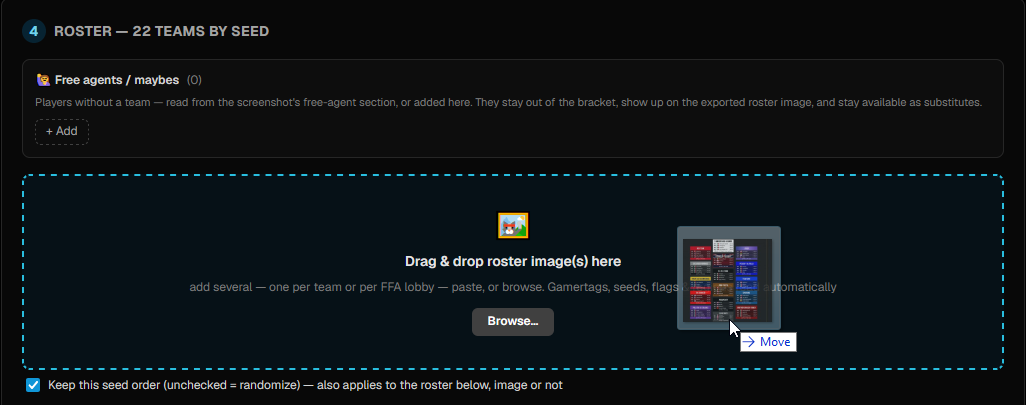
Drop a screenshot of the sign-up sheet — or several, one per team — onto the roster step and it reads the gamertags, seeds, country flags and regions out of the image. Pasting and browsing work too.
If the image labels the boxes Team 1, Team 2 and so on, the imported name carries the first player listed — Team 1 (B3 BlockBuster) — so the rows are still tellable apart once they are out of the picture. A name someone actually chose is left alone. Everything imported lands in the normal editable fields, so anything the reader got wrong is just typing to fix.
Pools and seed points
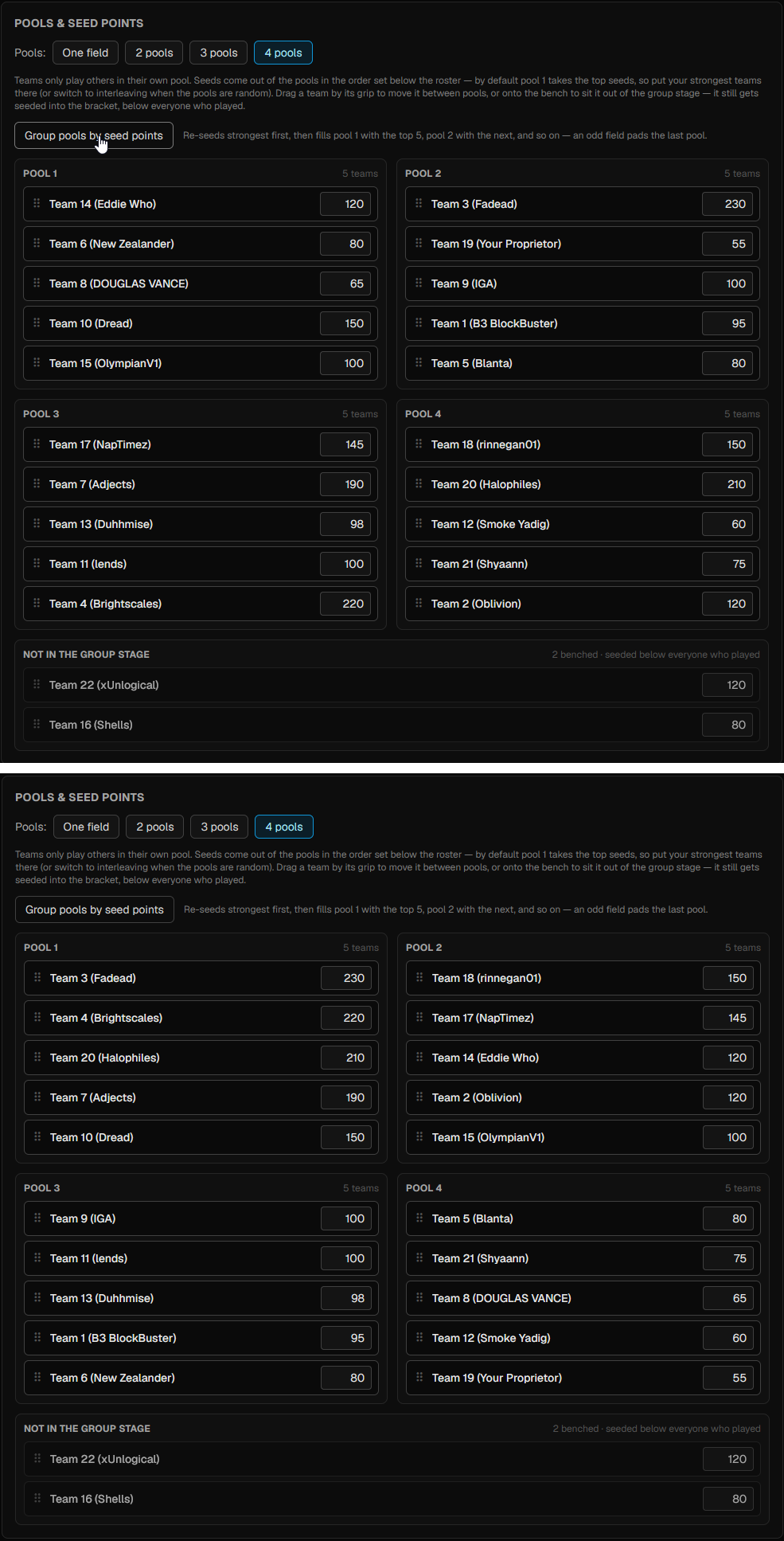
Below the roster, round robin and Swiss get a Pools & seed points block. Round robin plays one field; Swiss can be split into up to four pools, and teams only play others in their own pool during the group stage.
Seed points are whatever ranking you already have — points from a previous season, a ladder rating, your own gut order. They do two things: they decide the order teams are dealt into pools, and they break ties in the seeding that comes out of the group stage. They are optional; leave them blank and the roster order stands.
Picking 2 pools, 3 pools or 4 pools splits the roster into that many boxes. Group pools by seed points re-sorts the field strongest-first and deals it into them in blocks — the top slice to pool 1, the next to pool 2, and so on, because pool 1 is the strong tier under By pool seeding. An odd field pads the last pool. The button stays disabled until every team has points, since dealing on missing numbers would just be the roster order wearing a hat.
Nothing there is final. Drag a team by the grip on the left of its card and drop it into another box. The last box, Not in the group stage, is a place to drop teams as much as a label: anyone sitting there plays no group matches and is seeded into the playoff bracket below everyone who did. Drag them back out to un-bench them. Dragging works with a mouse or a finger, and the grip also takes ← and → once focused, for moving a team without a pointer.
Uneven pools are allowed and flagged rather than blocked; an odd pool just hands out a bye each round. How the pools then become playoff seeds — pool 1 on top, or the pools interleaved — is the Pools become seeds by setting back in step 2.
Free agents and maybes
Players who are not on a team yet can be registered as free agents. They never affect the bracket — that is built from teams — so they can sit in the pool for the whole tournament. The point is that they stay available in the substitute picker after it starts, which is exactly when you need someone at short notice.
4.Connecting Discord
Screenshots and announcements channels
Two channels, and they can be the same one:
- Screenshots channel — the one the bot watches. Players post results here.
- Announcements channel— where results and "now up" posts go. Leave it unset and it defaults to the screenshots channel, where the bot replies threaded under the screenshot it is about.
Both are picked from dropdowns on the admin page just before you start, grouped by server. Only channels in servers that you and the bot are both in appear.

When the channels get set
At the moment you start the tournament, and only then — the pickers live in the start block and disappear once it is running. Decide the channel before you hit start.
Linking a screenshots channel unlinks any other tournament already using it. That is deliberate — the bot finds the tournament for an incoming screenshot by channel, so two running at once on the same channel would be ambiguous. It does mean that starting a new tournament in last week's channel quietly takes that channel away from the old one.
Tournament admins
An optional field at setup (and on the admin page any time after): the Discord usernames of whoever is running the day. When a screenshot needs a human, the bot DMs them the read with a button that opens that exact game in the admin panel — score it, confirm it, or forfeit it from there. Anyone listed can sign in with Discord and run the tournament. Leave it blank and the DMs come to you.
Silent mode
A switch on the admin page. The bot keeps reading screenshots and running the bracket exactly as normal, but makes no visible mark in Discord at all — no replies, no announcements, not even reactions. It is for dry-running a real tournament, or for working in a channel without spraying it with posts. Screenshots that need a human are still DMed to your tournament admins, since nobody else sees those.
5.Starting it
Until you start, the tournament sits in setup and the public page shows only the registered list. Starting is what builds the bracket and opens round 1.
Check the seeds
Drag the list into the order you want — first is seed 1. Seeds decide the round-1 pairings, so this is only editable before the start.
Arrange round 1
The round-1 matchups are seeded automatically and then handed to you as something you can rearrange: drag teams between matches, or drop a team out entirely if they no-showed. Whatever arrangement you leave it in is what gets built — the seeds are rewritten behind the scenes so the format produces exactly those matchups.

Pick the channels in the same block, then start. If a team is short of players the page says which seeds still need filling instead of letting you start.
6.While it runs
What happens to a screenshot
A player posts a post-game scoreboard in the screenshots channel. The bot replies that the screenshot was captured, reads the image, matches the gamertags it finds against your rosters to work out which match it is, and reads the scores.
- Confident about both the match and the score — it records the game, advances the bracket and announces the result.
- Not confident — nothing is said in the channel. Your tournament admins get a DM with the read, Confirm and Reject buttons, and a link straight to the game in the admin panel, showing which gamertag it mapped to which player so you can see what it got wrong.

The reactions, and what they mean
- 👀 — picked it up, reading now.
- ✅ — recorded.
- 🔁 — this exact image was already accepted, so it was skipped rather than counted twice.
- 👀 with no ✅ — captured, but it needs a human. The admins have a DM about it.
Unknown players
A gamertag that is not on any roster is added to the team it played for, as long as no more than half of that side is unrecognised — two new names beside two known teammates on a 4v4 is fine. Their stats count and the game records as normal, and the result announcement says who was added. More unknowns than that and the bot can't be sure whose side it is, so the admins get a DM and the admin page raises an alert. Once the roster is right you can have the bot re-read the pending screenshot rather than asking anyone to post it again.
7.Organizer controls
Everything here lives on the tournament's Admin tab. Most of it is guarded: an action that would rewrite history the tournament has already moved past is refused rather than quietly corrupting the bracket.
Recording a score by hand
Every match waiting to be played is listed under Matches to playwith a score form. You can enter each player's score, kills, assists and deaths — the team score is the sum of its players' scores, and the per-player numbers show up on the stats pages afterwards.

Forfeiting a game
Hands a single game to one side. The series carries on around it.
Undoing a series
Rolls a completed series back so it can be replayed or re-entered. Use this when a result went in against the wrong match, or a game was recorded that should not have been.
Re-scoring a game from its screenshot
Screenshots are stored with the game, so a result that looks wrong can be re-read without anyone re-posting anything. Re-score hands the stored image to a stronger model than the bot uses live and shows you the new read to approve or discard — nothing changes until you accept it. It is available while the result is still reversible.
Re-reading a pending screenshot
For a screenshot waiting on your review rather than one already recorded. This re-reads it with the stronger model and re-checks it against the roster as it stands now — so after you have added a substitute or fixed a gamertag, the score form fills in properly and the unknown-player alert clears. It does not record anything; you still confirm.
Changing a series length mid-tournament
A whole round can be changed while none of its matches have started, and the new length carries into rounds generated later.
A single match can be changed even with games already recorded. The series is re-evaluated under the new length: shortening can clinch it early — games played past the clinch are dropped and the winner advances — and lengthening can re-open a series that had been decided, un-advancing the winner until it is actually won.
Fixing a gamertag
Under ✏️ Fix a gamertag. This is for typos the screenshot reader cannot match — someone registered as Zingersonly whose actual tag is Zingersonly1. It is allowed only while that player's team has no recorded results yet, since the tag is how past results were attributed.

Subbing a player in
Two halves, and you can do either or both:
- Bench the player going out. They are dropped from the active roster but not deleted — every stat they already recorded stays intact and keeps showing on their player page.
- Add the player coming in. If they already exist — a free agent, a benched player, someone from another team — they are moved across. Otherwise they are created.
A team is allowed to sit above its nominal size for a while; score entry only counts the players who actually played. Before the tournament starts, edit the roster on the setup page instead.

Adding a replacement entrant
For a drop-out's replacement who was never registered at all. This adds them as their own solo entrant, available to place into a lobby. It does not touch the dropped player's team, participant record or stats — it is a wholly separate row.
Coaches
A team can be given a coach. It is display only — a coach is never a participant, so it never affects rosters, scoring or the bracket.
8.Formats that run in rounds
Swiss and round robin
The group stage does not roll straight on. When every match in a round is done, the admin page offers the next round for you to look at before it starts — so you see the pairings the standings produced, and can fix anything odd, rather than finding out afterwards. Standings are on the same page, with the tiebreaks you configured.
Confirming the top cut
When the group stage finishes, the playoff bracket is not built automatically either. You get the top cut to confirm — the seeds and the round-1 matchups — and can rearrange them first. This is deliberate: a group stage that ends in a tiebreak you disagree with is far easier to fix before the bracket exists than after.

FFA lobbies
FFA runs as lobbies rather than matches. You set the lobby size, how many games each lobby plays per round, how many advance — per lobby, and a cap on the total — and optionally a points-per-placing scoring system with its own tiebreaks. Each round's lobbies appear on the admin page to score, and you confirm the next round the same way as Swiss.
9.What everyone else sees
The bracket
Public, no login. Each card shows the seeds, both teams, their rosters with country flags, and the series score. Byes are not drawn — a team with one simply appears in the next round. Cards are named by letter (Match A, Match B) and the bot uses those same letters when it announces a result, so the two always agree.
Clicking View scoreboard on a played match opens the per-game scoreboard beside that card. The bracket scrolls sideways from a bar at the top as well as the bottom, and can be dragged like a canvas.

Teams, stats and player pages
Teams lists every entrant with their roster, record and whether they are still alive, searchable by team or player. Statsaggregates every player's numbers across the tournament, ordered by KDA — except in round robin and Swiss, where rows are ordered by the player's team standing, so a row's position is their placing. Individual match, team and player pages go deeper, and players are clickable from any scoreboard.
10.Housekeeping
Start time
Can be set or cleared at any point. Enter it in Eastern; everyone else sees it converted to their own region.
Purging screenshots
Stored screenshots are the bulk of a finished tournament's size, and they are only needed while a result might still be disputed. Purging deletes the images and nothing else — games, scores, stats and the submission records all stay. The one thing you lose is the ability to re-score those games, since re-scoring works by re-reading the image.
Deleting a tournament
Removes the tournament and everything attached to it, screenshots included. There is no undo.